This page is optimized for desktop computers and tablets. To access it, try one of the following points:
- Access this page from a different device.
- If you’re on a tablet, rotate it.
- Check the “Desktop site” option in your browser settings.
This page is optimized for desktop computers and tablets. To access it, try one of the following points:
General RedManning Mode settings are configured in this tab.
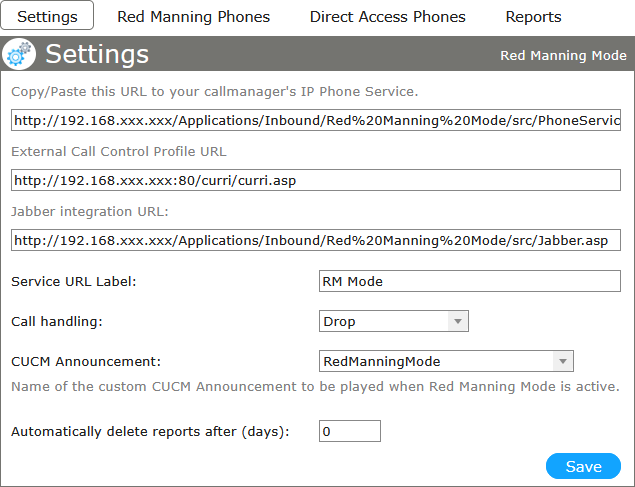
The URLs at the top are used to integrate the service into the call manager (see Requirements) and optionally into Jabber.
Place the respective service URL on a line button on the phones that will serve as Red Manning phones. This button can then be used to activate and deactivate red manning mode.
| Service URL Label | This text will appear on all red manning phones as label of the button that is tied to the service. Additionally, the label will indicate if red manning mode is activated or deactivated. | ||||||
| Call handling |
Set how to handle calls made to red manning phones while red manning mode is active.
|
||||||
| CUCM Announcement | Select the custom CUCM announcement to be played when red manning Mode is active. | ||||||
| Automatically delete reports after (days) | Delete reports data after the set number of days |
Freiburgstrasse 251
CH-3018 Bern
Switzerland
T: +41 31 531 11 11
F: +41 31 531 11 12
sales@ctmodule.com
Gospodara Vučića 145
RS-11000 Belgrade
Serbia
T: +381 18 308076
sales@ctmodule.com