This page is optimized for desktop computers and tablets. To access it, try one of the following points:
- Access this page from a different device.
- If you’re on a tablet, rotate it.
- Check the “Desktop site” option in your browser settings.
This page is optimized for desktop computers and tablets. To access it, try one of the following points:
 Export Article
Export Manual
x
Export
Export Article
Export Manual
x
Export
 Print
Print
This manual documents the optional Artificial-Intelligence layer of ProfIVR. It is written for Callisto system administrators and integrators who configure inbound call handling, and it should be read together with the standard ProfIVR Manual, whose concepts (ACDs, DTMF menus, Non-Business Hours, Holidays and Transfer Controls) it builds upon rather than replaces.
The AI capability is an enhancement of the existing ProfIVR DTMF menu. Every feature of the classic menu continues to work exactly as before. The AI simply adds a new, optional way of guiding a caller to the correct destination. A menu can therefore be operated in the traditional touch-tone manner, or, where enabled, as an AI-assisted conversation that ultimately uses the very same options and destinations already defined for that menu.
The AI enhancement is license-gated. The AI-related options are shown in the ProfIVR interface, and the AI behavior is enabled, only when a separate AI License has been added to the Callisto system. Without that license ProfIVR behaves precisely as the classic DTMF menu described in the standard ProfIVR Manual, and none of the AI settings are visible. Adding the license unlocks the AI configuration described in this document and allows it to be switched on per DTMF menu.
When the AI option is enabled on a DTMF menu, a call that reaches that menu is handled as a natural spoken conversation between the caller and an AI Agent, instead of requiring the caller to listen to a list of choices and press a digit. The agent greets the caller, listens to the request in the caller's own words, and asks follow-up questions whenever it needs more information to understand what the caller needs.
The purpose of the conversation is to identify the best option for the caller. The routing targets are unchanged: they are the options already configured on the DTMF menu, each with its destination defined by the standard Transfer Controls (transfer, blind transfer, bridge, ProfACD queue, application, voicemail, sub-menu or terminate). Based on the conversation and the caller's answers, the AI Agent determines which option fits best and, once it is confident, simply performs the transfer to that option's destination.
The behavior of the AI Agent is not coded; it is described in plain text. Two kinds of description work together:
In short: the system message governs how the agent converses, and the option descriptions tell it where each request should ultimately go. Writing these descriptions well is the core configuration task for an AI-enabled menu and is covered in detail in the following sections.
Switching the AI enhancement on is deliberately simple. Once the AI License is present on the Callisto system, every DTMF menu in ProfIVR gains one additional control: an AI enhancement checkbox. No other setup is needed to activate the feature itself.
To enable the AI Agent for a particular menu, open that DTMF menu and tick the checkbox, then save. From that point on the menu handles incoming calls as an AI-assisted conversation instead of the classic touch-tone prompt. Leaving the box unchecked keeps the menu operating exactly as before, as a standard DTMF menu.
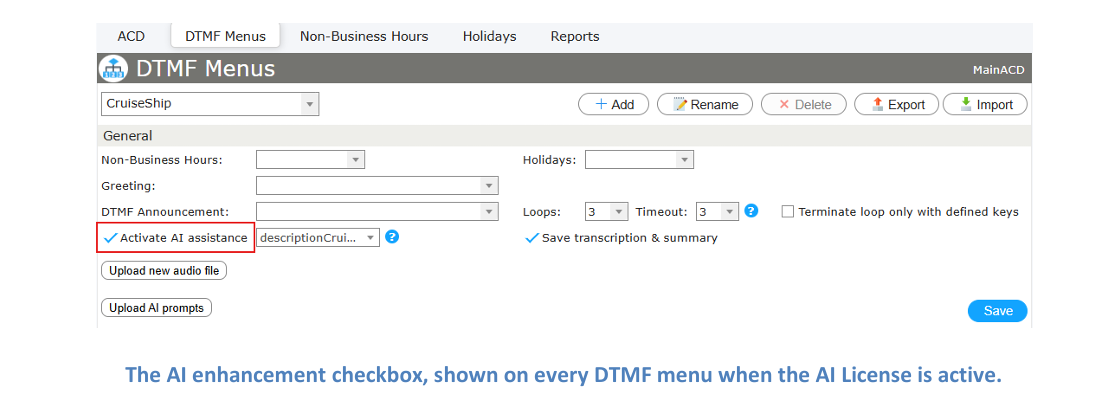
Info: Because the setting lives on each DTMF menu individually, the AI enhancement can be applied selectively: some menus may run as AI conversations while others continue to use traditional DTMF selection. This makes it easy to introduce the AI gradually — for example, on a single front-line menu — before rolling it out more widely.
When the checkbox is ticked, the AI configuration for that menu becomes relevant: the system message and the per-option descriptions that direct the agent's behavior. Both are described in the following sections.
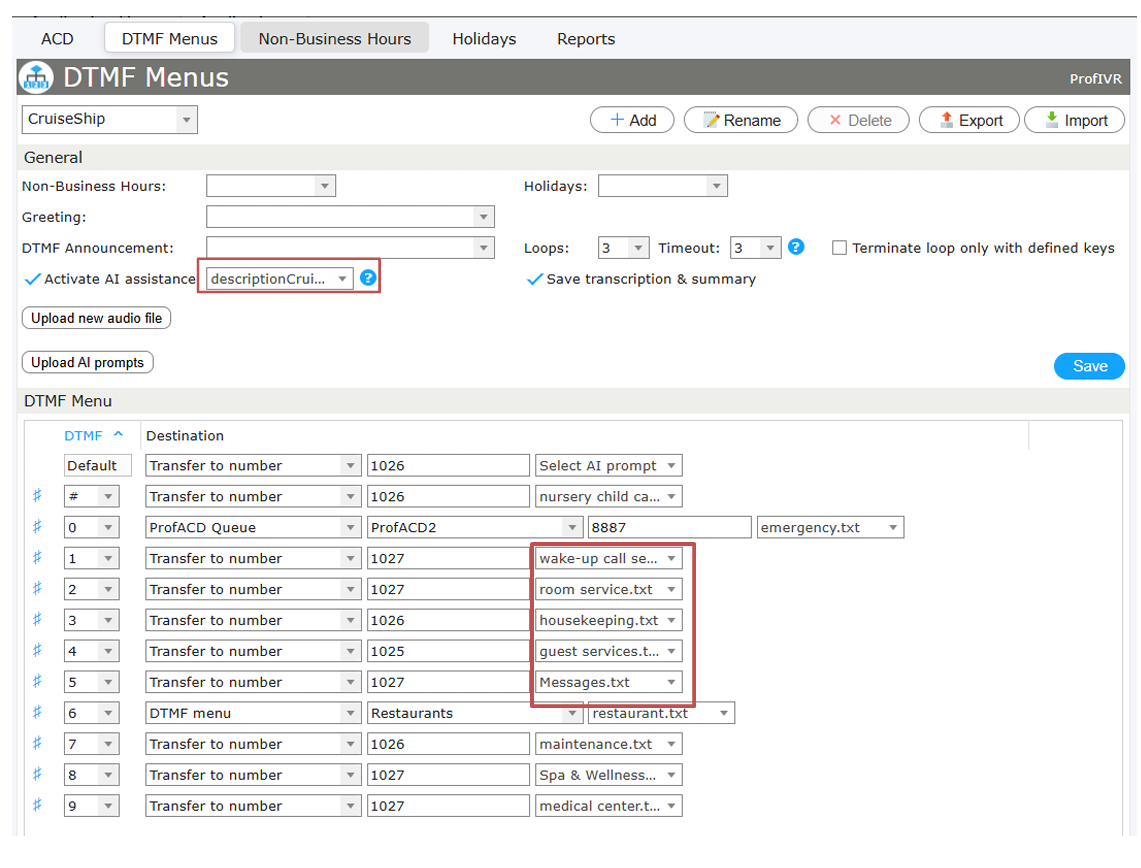
The behavior of the AI Agent is driven entirely by plain-text prompt files. For an AI-enabled DTMF menu there are two kinds of file:
Together these files give the agent everything it needs: the main description tells it how to converse, and the option descriptions tell it what each available option is for. The craft of writing an effective system message — persona, conversation flow, gates and formatting — is covered in detail in the companion ProfIVR Manual (AI Enhanced). This section concentrates on the file model and on how these files are loaded into ProfIVR.
There are two ways to bring the prompt files into an AI-enabled DTMF menu: uploading them individually or importing a complete menu from a single JSON file.
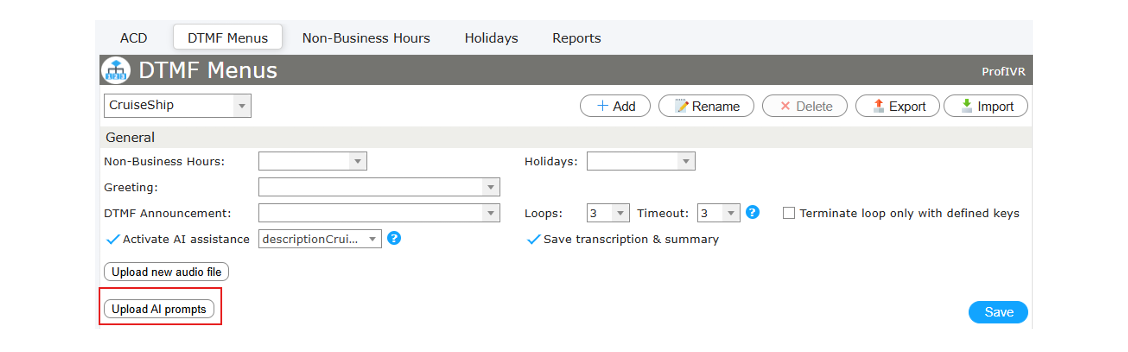
Using the Upload prompt button, the text files are uploaded to the Callisto system one by one. Afterwards the correct file must be assigned to each part of the menu: the main description for the DTMF menu itself, and the matching description file for every option. This method gives full manual control and is convenient when only a single prompt needs to be changed.
Each DTMF menu also has an Import option and a matching Export option. Export writes the entire menu to a single, human-readable JSON file; Import loads such a file back in. The JSON bundles everything in one place — the menu settings, the list of options with their destinations, and the full text of every prompt (both the main description and each option description) embedded inline. Importing a menu therefore loads the whole configuration, including all prompt files, in one step — no need to upload files individually.
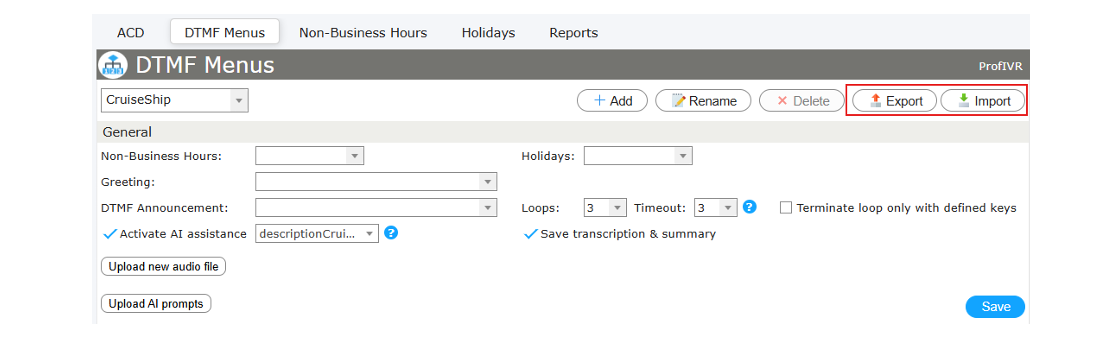
This makes it easy to move a complete configuration between systems, keep a backup, or hand a menu to someone else for editing. The example file shows the structure:
{
  "callisto": {
    "type": "ProfIVR.DtmfMenu",
    "formatVersion": 1,
    "schemaVersion": 1007,
    "exportedFrom": "ProfIVR",
    "exportedAt": "2026-06-19 12:25:24"
  },
  "menu": {
    "name": "CruiseShip",
    "aiEnabled": 1,
    "promptTxt": "descriptionCruise.txt",
    "saveTranscript": 1
  },
  "dtmf": [
    { "dtmf": "0", "destination": ["ProfACD", "ProfACD2", "8887"], "promptTxt": "emergency.txt" },
    { "dtmf": "1", "destination": ["Transfer", "1027"], "promptTxt": "wake-up call service.txt" },
    { "dtmf": "6", "destination": ["DTMF", "Restaurants"], "promptTxt": "restaurant.txt" }
    ... one entry per option ...
  ],
  "prompts": {
    "descriptionCruise.txt": "You are a helpful Cruise Ship voice Assistant ...",
    "emergency.txt": "...",
    "restaurant.txt": "..."
    ... the full text of every prompt file, inline ...
  }
}
The main parts of the file are:
A traditional DTMF menu is limited by the telephone keypad. A caller can only press the digits 0–9 and the two special keys ∗ and #, so a classic menu can offer no more choices than there are keys — one destination per key.
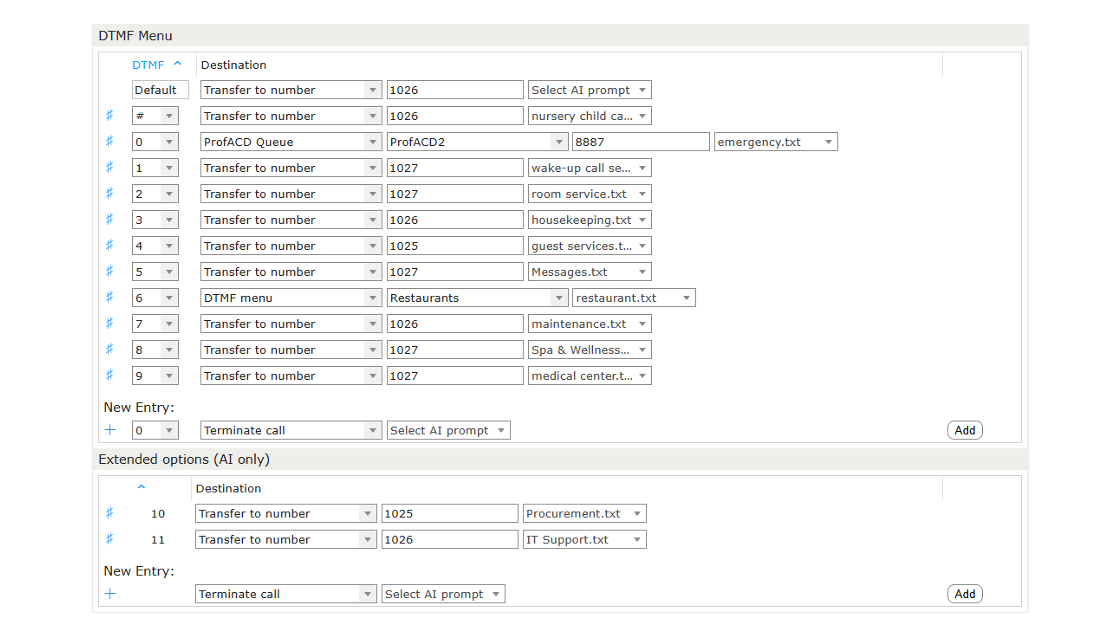
When a menu is handled by the AI Agent, the caller no longer presses keys at all: they simply describe what they need and the agent selects the destination. This removes the keypad limit, so an AI-enabled menu can define more options than there are keys on a phone. These additional entries are called extended options, and they are available only when the AI enhancement is active.
Extended options are numbered beyond the keypad — 10, 11, 12, and so on. Because they cannot be reached by pressing a key, a classic DTMF caller never uses them; they exist purely to give the AI Agent more distinct destinations to route to.
Configuring an extended option is the same as configuring a standard option: each one has a destination defined through the standard Transfer Controls and its own per-option description file telling the agent what the option is for. The only difference is that the option is reached through conversation rather than a key press.
ProfIVR includes a Reports section for tracking what happens to a call. It lets an administrator follow how each call went and where the caller was finally transferred, which is especially useful for an AI-enabled menu where the routing decision is made through conversation rather than a fixed key press.
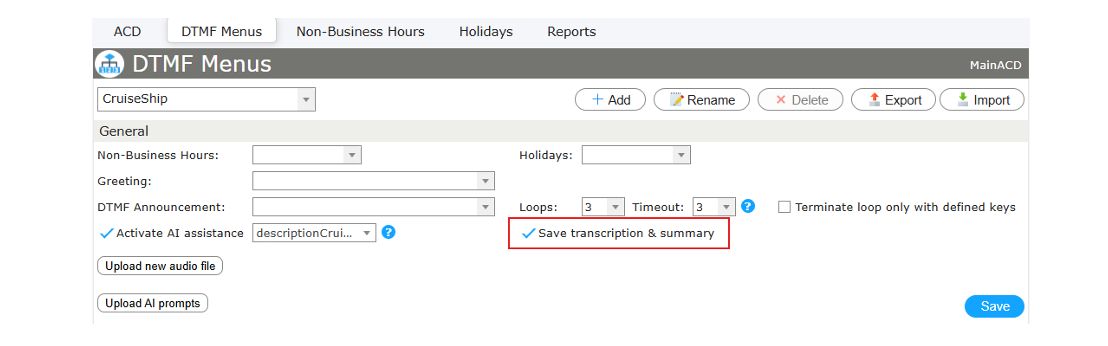
Reporting is switched on separately for each DTMF menu. Before any call data is recorded, tracking must first be enabled on the menu by ticking its reporting checkbox and saving. Just like the AI enhancement itself, this is a per-menu setting, so reporting can be turned on only for the menus that need it.
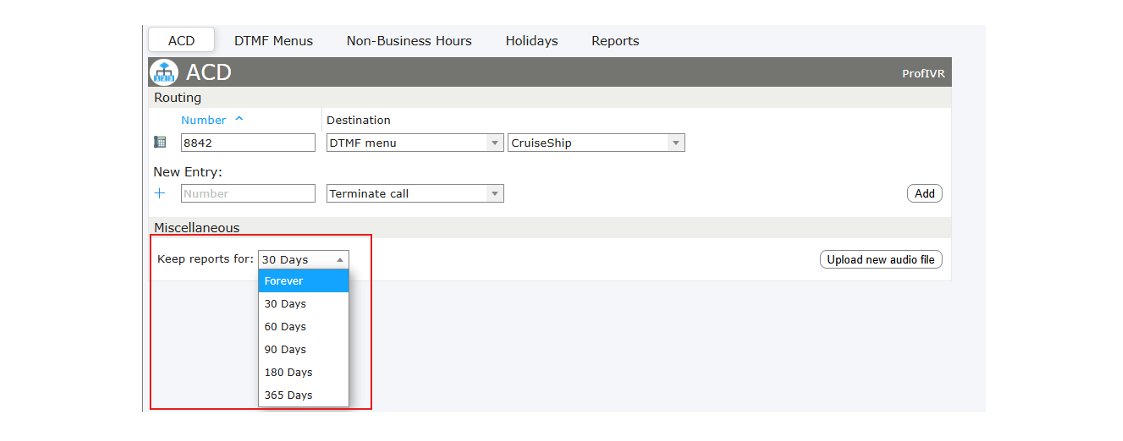
How long the recorded reports are retained is configured globally, at the application level — not per menu. A single setting determines the retention period for all stored reports, after which older entries are removed automatically. This keeps report storage under control and helps meet data-retention requirements.
The saved reports are reviewed in a separate Reports tab, which shows a list of all reports for a selected period of time.
Each entry summarises one call at a glance — when the conversation took place, its duration, the caller, the number that was called, the final action taken, and a simple representation of the call flow — and indicates whether it was an AI call or a standard one.

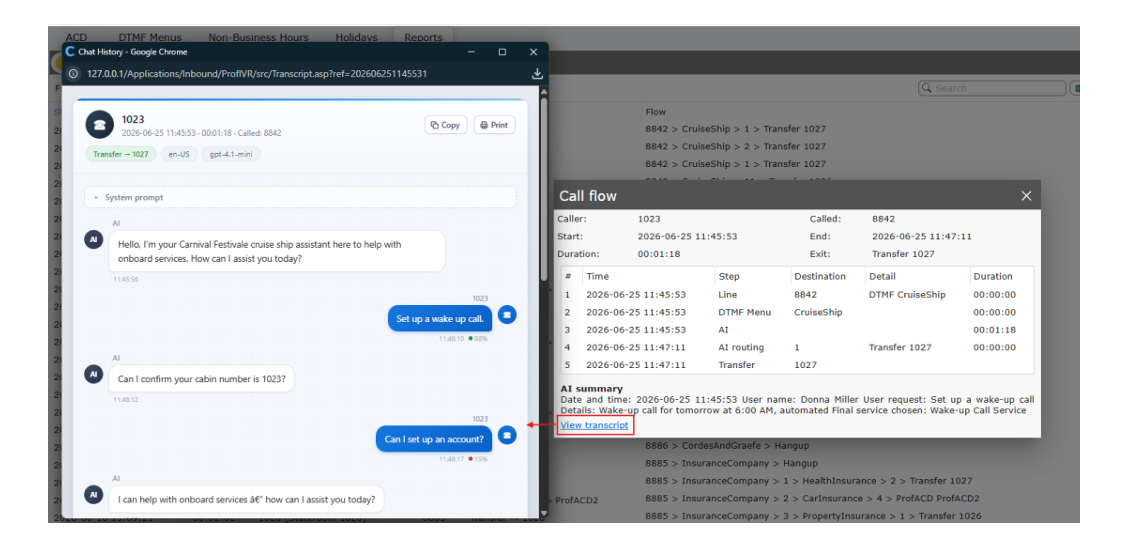
For more detailed information, click the Show button on a report. This opens a separate window with a clearer, more detailed representation of the call flow. If the call was AI-enhanced, an AI summary of the conversation is also shown.
For an AI-enhanced call there is one further option: the full transcript of the conversation between the caller and the AI Agent can be reviewed, giving a complete record of what was said and how the agent reached its routing decision.
When ProfIVR is configured to use AI, the ProfACD Viewer gains the additional ability to provide agents with more information about the call. Before the call reaches an agent, the Viewer displays an AI Call Summary generated from the caller’s interaction with ProfIVR, giving the agent an overview of the reason for the call and the service the caller was routed to.
For more information, refer to the chapter ProfACD Viewer with Call Summary.
Freiburgstrasse 251
CH-3018 Bern
Switzerland
T: +41 31 531 11 11
F: +41 31 531 11 12
sales@ctmodule.com
Gospodara Vučića 145
RS-11000 Belgrade
Serbia
T: +381 18 308076
sales@ctmodule.com