This page is optimized for desktop computers and tablets. To access it, try one of the following points:
- Access this page from a different device.
- If you’re on a tablet, rotate it.
- Check the “Desktop site” option in your browser settings.
This page is optimized for desktop computers and tablets. To access it, try one of the following points:
 Export Article
Export Manual
x
Export
Export Article
Export Manual
x
Export
 Print
Print
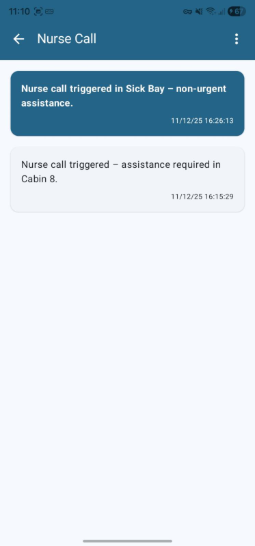
The Group Details screen provides a chronological log of all received notifications and alarms belonging to a specific alarm group (e.g., "Nurse Call"). Events are ordered with the most recent at the top.
| Element | Description |
|---|---|
| Title | Displays the name of the selected event group (e.g., "Nurse Call"). |
| Back Button (←) | Returns to the previous screen or the main application dashboard. |
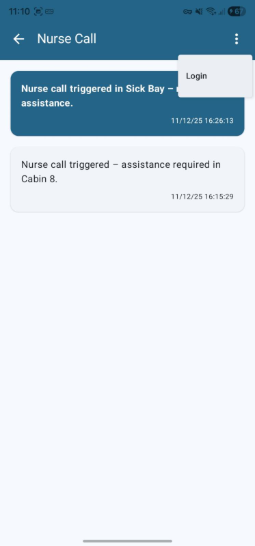
| Options Menu (⋮) | Overflow menu with Login/Logout actions for this specific group. |
| Action | Description |
|---|---|
| Login | Subscribes the user to alarms from this group. New alarms will be received for this category. |
| Logout | Unsubscribes the user from this group. No new alarms will be received for this category. |
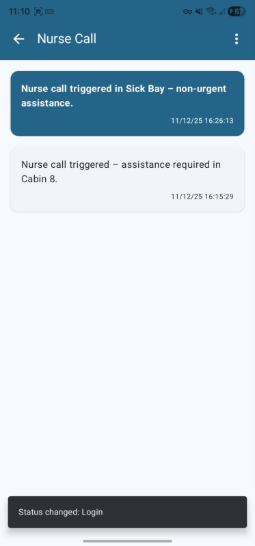
Upon successful login or logout, a temporary snack bar notification appears at the bottom of the screen to confirm the action.
| Card Element | Description |
|---|---|
| Description | Brief alarm description (e.g., "assistance required in Cabin 8"). |
| Timestamp | Date and time of the event in format DD/MM/YY HH:MM:SS, shown in the bottom-right of the card. |
| Status Indicator | Blue card background indicates an unread alarm. |
Freiburgstrasse 251
CH-3018 Bern
Switzerland
T: +41 31 531 11 11
F: +41 31 531 11 12
sales@ctmodule.com
Gospodara Vučića 145
RS-11000 Belgrade
Serbia
T: +381 18 308076
sales@ctmodule.com