This page is optimized for desktop computers and tablets. To access it, try one of the following points:
- Access this page from a different device.
- If you’re on a tablet, rotate it.
- Check the “Desktop site” option in your browser settings.
This page is optimized for desktop computers and tablets. To access it, try one of the following points:
 Export Article
Export Manual
x
Export
Export Article
Export Manual
x
Export
 Print
Print
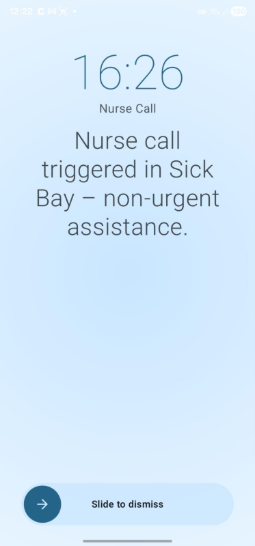
The Fullscreen Alarm is an interrupt-style full-screen alert view designed to notify the user of a triggered alarm regardless of what is currently displayed on their device. It is shown even when the app is in the background or the screen is locked, provided the Overlay permission has been granted.
| Element | Description |
|---|---|
| Timestamp | The time of the alert displayed prominently in large font (e.g., 16:26). |
| Group name | The alarm group labeled directly below the time (e.g., Nurse Call). |
| Message | A clear alarm message (e.g., "Nurse call triggered in Sick Bay – non-urgent assistance"). |
| Slide to dismiss | A slide gesture at the bottom of the screen dismisses the fullscreen alarm. |
Note: The Fullscreen Alarm requires the Overlay Permission to be granted. Without it, critical alarms may not be displayed over other apps.
Freiburgstrasse 251
CH-3018 Bern
Switzerland
T: +41 31 531 11 11
F: +41 31 531 11 12
sales@ctmodule.com
Gospodara Vučića 145
RS-11000 Belgrade
Serbia
T: +381 18 308076
sales@ctmodule.com