This page is optimized for desktop computers and tablets. To access it, try one of the following points:
- Access this page from a different device.
- If you’re on a tablet, rotate it.
- Check the “Desktop site” option in your browser settings.
This page is optimized for desktop computers and tablets. To access it, try one of the following points:
 Export Article
Export Manual
x
Export
Export Article
Export Manual
x
Export
 Print
Print
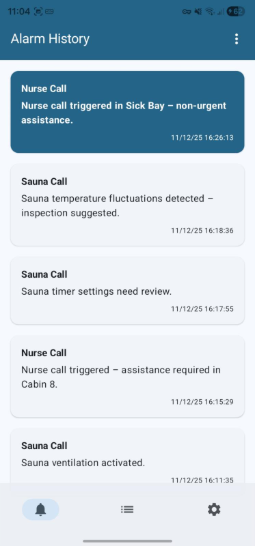
The Alarm History screen displays a chronological log of all received notifications and alarms within the application. It provides a quick reference for reviewing past events and their details.
| Element | Description |
|---|---|
| Title | "Alarm History" displayed at the top of the screen. |
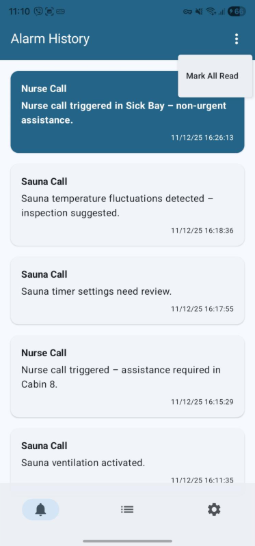
| Options Menu (⋮) | Three vertical dots in the top-right corner open an overflow menu. |
| Action | Description |
|---|---|
| Mark All Read | Marks every active alarm in the list as read, clearing the blue unread highlight on all cards. |
The central part of the screen contains alarm cards ordered chronologically, with the most recent event at the top.
| Card Element | Description |
|---|---|
| Group name | Bolded text indicating the alarm source (e.g., Sauna Call, Nurse Call). |
| Description | A brief description of the alarm event. |
| Timestamp | Date and time the event occurred, shown in the bottom-right of the card. |
| Unread indicator | Blue card background denotes an unread alarm. |
Tapping on any alarm card performs two actions simultaneously:
Freiburgstrasse 251
CH-3018 Bern
Switzerland
T: +41 31 531 11 11
F: +41 31 531 11 12
sales@ctmodule.com
Gospodara Vučića 145
RS-11000 Belgrade
Serbia
T: +381 18 308076
sales@ctmodule.com